Image Classification - Data Science
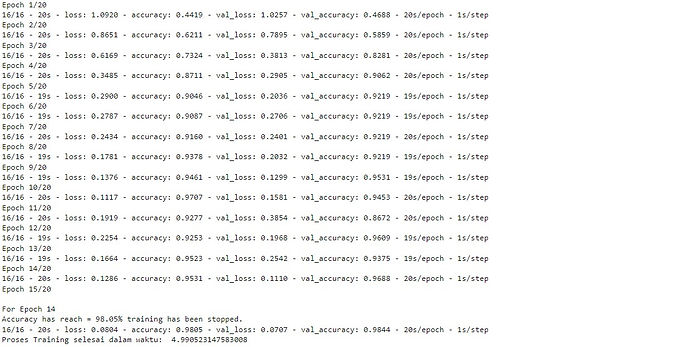
I had a Machine Learning Developer scholarship from Dicoding in their collaboration with Indosat Ooredo. I managed to learn it from start to finish in approximately 2 months. At the end of the course, students should be able to create an image classification program using Machine Learning. Here is the result of my final project, it had been reviewed and approved by Dicoding with 4 out of 5 stars. The model itself has an accuracy rate of 98,05%.
Readme and the entire code for this project are also available on Github.
Dataset Source
Download & Extract Dataset
Use wget command to download the dataset from the link.
Import zipfile and os. Extract using zipfile.
Import Libraries & Packages
Import all the libraries required for this project.
Check Directory
Use listdir from os library to read the content of “rockpaperscissors/rps-cv-images” directory. This is the directory that will be used for the base_dir.
Data Pre-processing with Image Augmentation and Preparation
Image augmentation is a part of the data pre-processing phase. Image augmentation generates new versions of training images from the existing dataset. For instance, images flip horizontally or vertically, rotate, zoom, etc. Also, before moving to the data modeling, I target the directory and generate batches of augmented data.
In this project, I use 6 parameters in ImageDataGenerator as seen below:
-
rescale = 1./255 : rescale the pixel value 1./255 from 0–255 range to 0–1 range.
-
rotation_range = 20 : rotate the image in range 0–20 degree.
-
horizontal_flip = True : rotate the image horizontally.
-
shear_range = 0.2 : shear angle in counter-clockwise direction in 0.2 degree range.
-
fill_mode = ‘wrap’ : fill outside boundary points with wrap (abcdabcd|abcd|abcdabcd) mode.
-
validation_split = 0.4 : split images by 40% of total dataset for the validation step.
I use the subset parameter because I have set the percentage of data for the training and validation phase in the previous step (validation_split parameter). There are 1314 images for training and 874 images for validation. The details of the code:
-
base_dir : path to the target directory (base_dir).
-
target_size = (100, 150) : all images found will be resized to 100 pixel x 150 pixel.
-
subset : a subset of data ‘training’ or ‘validation’ if validation_split is set in ImageDataGenerator.
Build CNN Architecture
The Convolutional layer is used to extract the attributes of the picture while the max-pooling layer will help to reduce the size of each picture from the convolutional process so that the speed of training will be much faster.
The first layer is an input layer with a shape of 100 x 150 RGB array of pictures represented by input_shape = (100, 150, 3). In the same line of code (second line), I have the first 2D convolutional layer with 32 nodes, 3 x 3 filter, and ReLU (Rectified Linear Unit) activation function. In the next line of code, I have a 2D max-pooling layer with a size of 2 x 2. Max-pooling works by choosing a pixel with maximum value and results in a new picture of the same size as the max-pooling layer (2 x 2).
After the pictures processed in a max-pooling layer, the pictures are then processed again to the next convolutional layer then the max-pooling layer, and so on. After the last max-pooling layer, the array of pictures are flattened to a 1-dimensional array and processed again in the hidden layer.
After that, the array of pictures that are already in 1-dimensional form is moved to the output layer and processed using the activation function again. This time, instead of ReLU, softmax function is used. The softmax activation function is used when the case is a multi-class classification. Since I have 3 classes, the number of output nodes are 3.
Compile the Model: Determine the Loss Function and Optimizer
After finishing the architecture, I then move to compile the pre-built model and specify the loss function, optimizer, and evaluation metrics. Since this project is about a multi-class classification case, I use the categorical cross-entropy loss function. As for the optimizer, I use adam optimizer as this adaptive optimizer works well in most cases. Finally, to monitor the model's performance, I evaluate them using accuracy metrics.
Use Callback for Early Stopping
To fasten up the speed of training, I use the callback function for early stopping when the model has already reached the accuracy threshold. Early stopping is useful to reduce the model’s tendency to be overfitted. As for this project, I determine the accuracy threshold to be 98%.
Train the Model
In this stage, I train the pre-built model in a total of 20 epochs using the training dataset that has already been prepared in train_generator and evaluate the model using the validation dataset that was prepared in validation_generator.
Since I implement a callback for early stopping, the training process is stopping when it achieves a minimum of 98% accuracy.
Predict an Image to Check the Model
The image classifier model is ready to be used!
When predicting new data, there might be some incorrect predictions. This is due to the training dataset I used previously. In the training dataset, all of the pictures are using a green-colored background, so if I don’t use similar background then the model might predict the result incorrectly.